Images your agentcan send.
Your WhatsApp agent sends data and gets back an image for the chat, in one tool call: a ticket for a customer, a sales chart for the owner. The model writes the data. Templates draw it and the math is done in code.
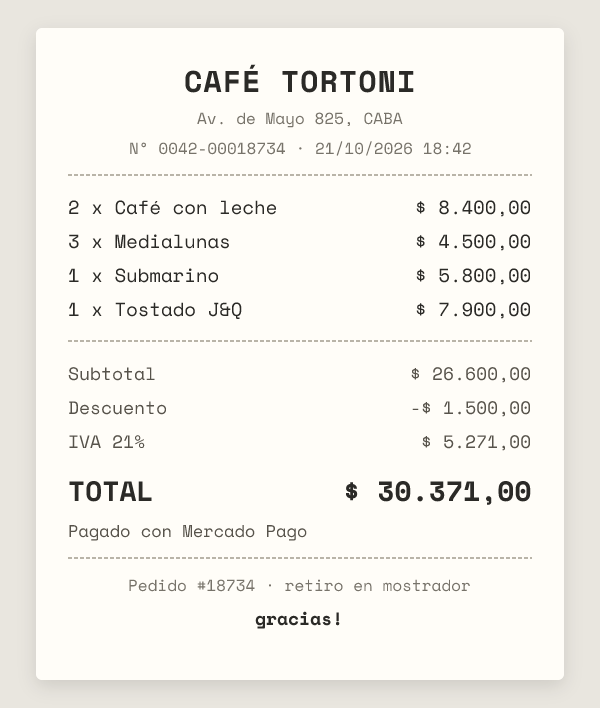

render_ticketFor the customer. Items, discount, tax and payment; totals computed in integer cents on the server.

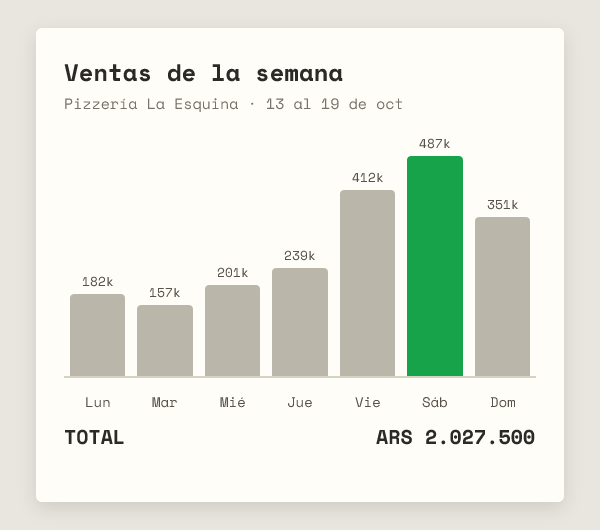
render_chartFor the owner. Up to 14 bars with values, the highest in green, and the total underneath.
WhatsApp agents can already send images, but the image has to exist at a URL first. This fills that gap: the agent generates the image from the conversation.
Store, items, quantities, prices, payment method. Whatever the conversation already has.
render_ticketPOST /tickets validates the order, computes subtotal, discount, IVA and total, and returns an image_url.
The URL goes straight into an image message. The customer gets a receipt, not a wall of text.
No storage: the ticket lives in the URL, so every image is cacheable forever. A ticket too big for WhatsApp's 2,048-character image_url limit is a 413, and bad input is a 400 the agent can read and fix.
curl -X POST $HOST/tickets \ -H 'authorization: Bearer $KEY' \ -H 'content-type: application/json' \ -d '{ "store": { "name": "Café Tortoni" }, "items": [ { "name": "Café con leche", "qty": 2, "price": 4200 }, { "name": "Medialunas", "qty": 3, "price": 1500 } ], "taxRate": 0.21, "payment": "Mercado Pago" }'
{
"image_url": "https://…/t/eyJzdG9y….png",
"totals": {
"subtotal": 12900,
"discount": 0,
"tax": 2709,
"total": 15609
}
}
// then, in the agent:
send_image({ image_url, caption: "Tu ticket 👇" })
Any agent that speaks MCP: add the server, send the result as an image, add one line of prompt.
Streamable HTTP. The client lists render_ticket and render_chart with their schemas. Keys are issued by hand while this is a prototype: ask for one.
Quick Images MCPhttps://quick-images-mcp.fguespe.workers.dev/mcp{ "Authorization": "Bearer <your key>" }Paste the ones you use, plus your own business data: menu, prices, sales.
Tickets: call render_ticket and send the image_url as an image, with the caption "Order for <customer>. Total: $<total>" using the total the tool returns.
Sales: find the tickets in this chat and in past chats. Call render_chart with one point per ticket (label: customer, value: total) and send it the same way, with the tool's total in the caption. If there are no tickets, say so. Sales and tickets are the same thing.
render_ticketrender_ticketRender the order ticket as an image. Returns image_url and totals.POST https://quick-images-mcp.fguespe.workers.dev/tickets{
"type": "object",
"properties": {
"store": {
"type": "object",
"properties": {
"name": {
"type": "string"
}
},
"required": [
"name"
]
},
"customer": {
"type": "string",
"description": "Customer name"
},
"items": {
"type": "array",
"items": {
"type": "object",
"properties": {
"name": {
"type": "string"
},
"qty": {
"type": "number"
},
"price": {
"type": "number"
}
},
"required": [
"name",
"qty",
"price"
]
}
},
"currency": {
"type": "string"
},
"payment": {
"type": "string",
"description": "Payment method, e.g. Mercado Pago"
}
},
"required": [
"store",
"items"
]
}render_chartrender_chartRender a bar chart (e.g. sales per day) as an image. Returns image_url and total.POST https://quick-images-mcp.fguespe.workers.dev/charts{
"type": "object",
"properties": {
"title": {
"type": "string"
},
"subtitle": {
"type": "string"
},
"currency": {
"type": "string"
},
"points": {
"type": "array",
"items": {
"type": "object",
"properties": {
"label": {
"type": "string"
},
"value": {
"type": "number"
}
},
"required": [
"label",
"value"
]
}
}
},
"required": [
"title",
"points"
]
}This calls the same endpoint the agent does.
The model passes items and prices. Subtotal, discount, tax and total are computed in integer cents on the server, so the number on the receipt is the number you charge.
Five lines of items as text get lost in a chat. A receipt is a format people already trust and screenshot.
Tickets and charts today: POST /charts turns a list of numbers into a bar chart for backoffice questions like "how did we sell this week?" (example). Order status and booking confirmations are the same pattern.